Instagram Reels Downloader
Download trending reels with high quality audio in MP4 format.
Explore ToolExtract and download original audio and background music from Instagram Reels and Videos in crisp 320kbps MP3 format.
Save from Insta lets you extract and download audio from public Instagram Reels and videos in MP3 format. Simply copy the Instagram video link, paste it into the box above, and save the audio directly to your phone, tablet, or computer. No app installation or login required.
Open Instagram and copy the link of the public Reel or video that contains the audio you want to save.
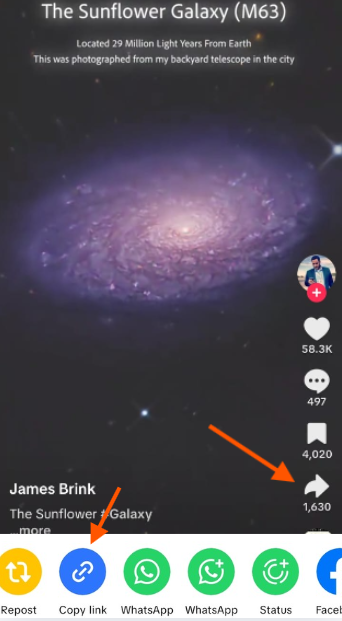
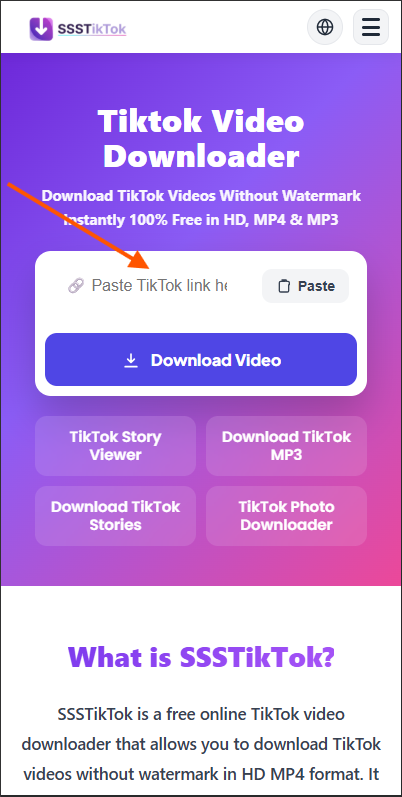
Visit SaveFromInsta.com and paste the copied Instagram link into the input box to extract the audio.
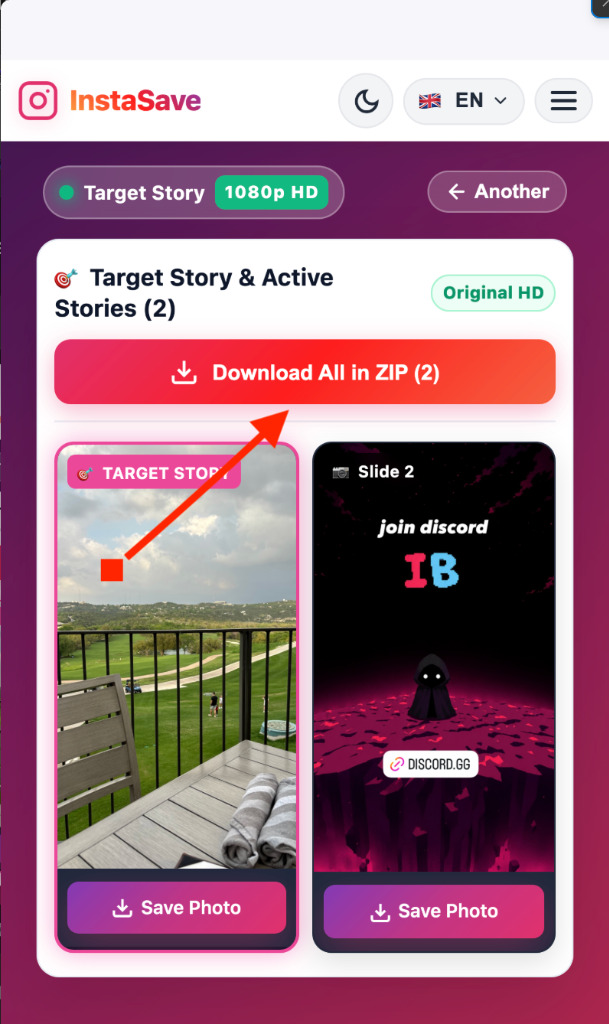
Click Download to save the audio as an MP3 file on your device and listen to it anytime offline.
Save audio in the best quality available from the original Instagram post. Whether you need an Instagram MP3 Download or want to keep your favorite soundtrack offline, our tool delivers clear and high-quality audio.
Our Instagram Reels Audio Downloader lets you save audio from public Reels, while the Instagram Video to Audio Downloader also supports standard Instagram video posts.
Your privacy always comes first. Our Instagram Downloader Audio tool never asks for your Instagram username or password. We only process the public link you provide and never store unnecessary personal information.
Use our Instagram Audio Downloader Online on Android, iPhone, Windows, Mac, Linux, tablets, or any modern browser. No installation, browser extension, or application is required.
Need more than one Insta MP3 Download? Download audio from as many public Instagram posts as you like without limits, subscriptions, or hidden charges.
Everything works directly from your browser. Simply paste the public Instagram link and complete your Insta Audio Download in just a few clicks.
Our Instagram Audio Downloader only processes the public Instagram link you provide to complete your Instagram Audio Download. We don't permanently store your files or collect unnecessary personal information. Download responsibly and always respect the rights of the original content creator.
| Features | Save from Insta | Others | |
|---|---|---|---|
| Direct 1080p Full HD Downloads | ✓ | ✕ | ✕ |
| Clean (No Watermark on Media) | ✓ | ✓ | ✕ |
| 100% Anonymous Viewing & Saving | ✓ | ✓ | ✕ |
| Full-Size Profile Picture (HD DP) | ✓ | ✕ | ✕ |
| Story Highlights Album Downloader | ✓ | ✕ | ✕ |
| Original Audio & MP3 Extraction | ✓ | ✕ | ✕ |
| No Account Login Required | ✓ | ✓ | ✕ |
| 100% Free & Unlimited Access | ✓ | ✕ | ✓ |
Need something more than an Instagram Video Downloader? Explore our free Instagram tools to download, view, and save different types of Instagram content in just a few clicks.
Download trending reels with high quality audio in MP4 format.
Explore ToolFind answers to the most common questions about using Save from Insta downloader.
Copy the public Instagram Reel or video link, paste it into our Instagram Audio Downloader, and click Download. Your audio will be ready in just a few seconds.
Yes. Our tool supports Instagram MP3 Download, allowing you to save audio in MP3 format for offline listening.
Yes. Our Instagram Audio Downloader is completely free to use with no hidden fees or download limits.
No. You don't need to sign in or share your Instagram username or password. Simply paste the public post link and download.
Yes. Our Instagram Reels Audio Downloader supports audio extraction from public Instagram Reels as well as video posts.
Yes. It works on Android, iPhone, Windows, Mac, Linux, tablets, and all modern web browsers.
No. For privacy reasons, our tool only supports publicly available Instagram posts and Reels.
This usually happens if the link is incorrect, the post is private, or the content has been removed. Check the link and try again.
Yes. We never ask for your Instagram login details or collect unnecessary personal information. Your privacy and security are always protected.
You should only download audio that you own or have permission to save. Always respect Instagram's terms and the rights of the original content creator.
Your MP3 file is usually saved to your browser's Downloads folder. On mobile devices, it may also appear in your Files or preferred music folder, depending on your device settings.